EDGE Lighting -LED Borderlight
- 4.7
- Rating
- 10.00M
- Installs
- Free
- Price
 Analysis by App-foxy
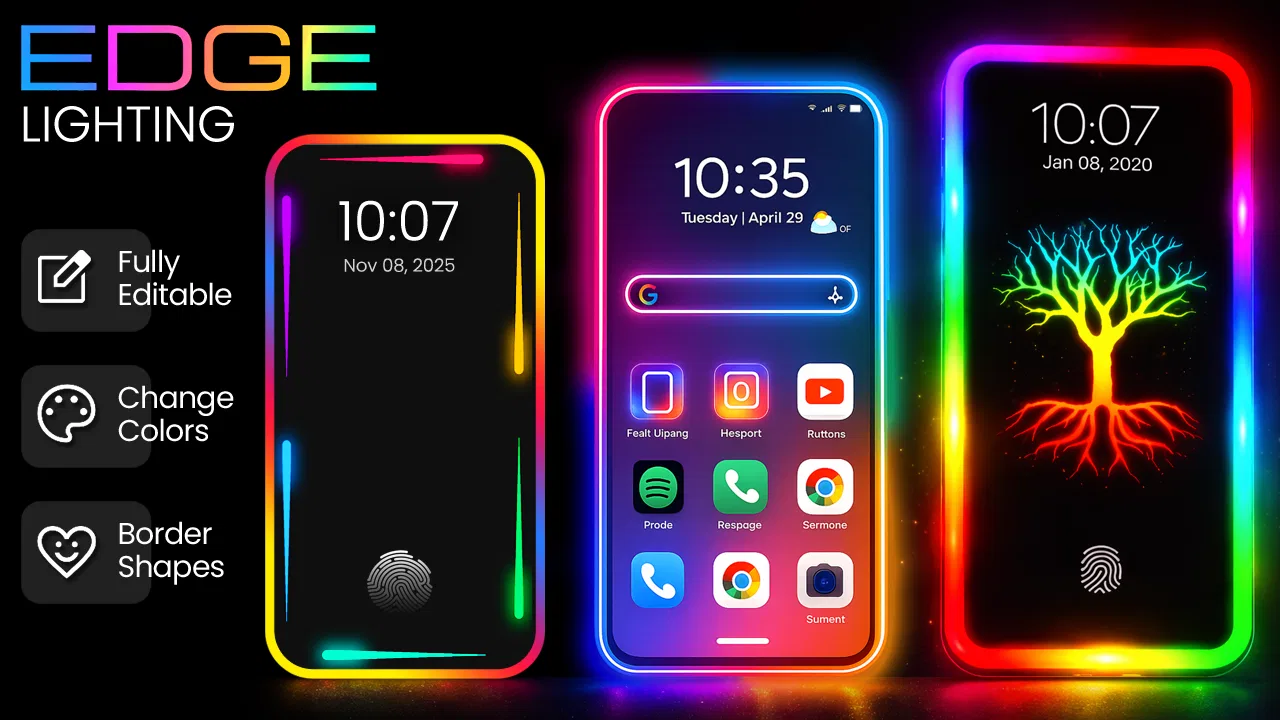
I installed EDGE Lighting -LED Borderlight because I wanted a more useful way to notice calls and notifications without turning on a loud sound every time. It is a free personalization app from Pixel Kraft Studios that adds a colored light effect around the edge of the screen, including on the lock screen, and it can also be used with caller identification and live wallpaper styling. My first impression was that it is less about changing the whole phone and more about making one small part of the interface—its border—feel intentional.
The app is aimed at people who enjoy visual customization but do not want to replace their launcher or rebuild every icon and widget. In everyday use, that distinction matters. I could leave my normal home screen in place and use the border effect as a visual cue when the phone was face down or sitting across the room. It also gave the lock screen a more decorative appearance, although the usefulness depended heavily on the phone model, display behavior, and how much visual activity I actually wanted.
From a quiet phone to a visible edge-lighting workflow
I find that moving from a plain phone display to an edge-lighting routine works best when I decide what I want the glow to do before I start adjusting its look. A restrained color can act as a gentle cue, while a brighter treatment suits a phone I need to notice from farther away. That practical choice leads naturally to the next question: how the effect holds up during heavier everyday use.
You May Also Like

 Blood Strike: 2.5 Anniversary
Blood Strike’s Loadouts Turn Every Drop Into a Tactical Gamble
A close look at Blood Strike’s custom loadouts: how fast access to signature weapons reshapes its battle royale rhythm, rewards preparation, and narrows the gap between fights.

 Pandora - Music & Podcasts
Pandora’s Music Is Easy to Start, but Harder to Recover
Pandora’s strength is its low-effort path from a seed to a station. Its weak spot is how much confidence it asks you to place in connection, setup, and quiet recovery.

 8 Ball Pool
 Is Built on Rivalries, Rematches, and Routine
A close look at the rivalries, rematches, shared routines, and unanswered safety questions that turn a quick pool match into a persistent mobile community.

 Samsung Music
’s Quiet Strength Is Playing What You Already Own
Its reach comes less from spectacle than from dependable access to a personal library. That simplicity is both the app’s strongest retention engine and its ceiling.

 AccuWeather: Weather Radar
AccuWeather Review: A Quick, Clear Forecast for Everyday Decisions
For everyday plans, the best forecast is the one you can understand quickly. AccuWeather makes rain timing, radar, and local conditions easy to act on, with a few trade-offs.

 Hill Climb Racing
Why Hill Climb Racing Still Turns Crashes Into One More Run
A tiny car, a bumpy hill and one more upgrade: Hill Climb Racing keeps resurfacing because its simple chaos makes every near-miss feel personal.
More From Our News Desk



Starting with the right expectation
The best way to approach this app is as a focused screen-edge tool, not as a complete personalization suite. The store presents it as “EDGE Lighting,” and that is exactly where its value sits: custom colors, border illumination, caller ID elements, and live wallpaper treatment are brought together around the display. It does not need to replace the phone’s entire visual identity to be worthwhile.
On my first run, I treated the setup like a small workflow. I began with the outcome I wanted: a border that was easy to notice but not so bright or animated that it became distracting. That led me to test color choices against both a dark lock screen and a brighter home screen. A color that looked elegant on black could become hard to distinguish over a busy wallpaper, so choosing the effect in isolation was not enough.
This is one of the app’s less obvious trade-offs. A vivid color is usually easier to see, but it can make a quiet phone look permanently active. Softer colors are more comfortable for long periods, yet they may lose impact in daylight. I found it more practical to choose a restrained default and reserve stronger combinations for situations where I genuinely needed visual attention.
Building the first border effect
The customization process is straightforward in concept: select the edge-lighting style, adjust the color treatment, and check how it sits around the display. The important part is not simply picking the most elaborate option. The border has to follow the shape of the phone convincingly, and the result looks better when the visual weight is balanced rather than concentrated in one corner or made excessively thick.
I recommend checking the effect while holding the phone in the same way you normally use it. A border that looks impressive while the device is flat on a desk may feel too prominent when reading at night. I also checked it with the phone locked, since the lock-screen experience is central to the app’s appeal. That test quickly showed whether the selected colors remained visible without making the screen feel like a notification panel that never settles.
The most useful setup is the one you can understand at a glance. I would not use several competing colors unless there is a clear reason. A single familiar color can become a quick visual language: one tone for ordinary activity, another for a person you expect to hear from, or a brighter choice for moments when the phone is being used as a visible alert. The app’s personalization focus makes this kind of simple routine possible, even though it is easy to over-customize at first.
Moving from decoration to practical notification awareness
Once the border looked right, I tested it as an attention cue rather than a wallpaper effect. This is where the app became more useful. If I placed the phone on a desk with the display facing away from me, the illuminated edge could attract my eye without requiring a ringtone. That is helpful in a shared room, during a quiet work session, or whenever I want to reduce sound without becoming unreachable.
The handoff from the app to the phone’s lock screen is important here. The effect only helps if the device allows the screen and its visual elements to behave as expected. Different Android implementations can handle lock-screen overlays, background activity, and display wake behavior differently. I therefore judge the result on the actual phone rather than assuming that a preview represents every situation.
For a realistic example, imagine working at home while waiting for a delivery call. I could keep the phone muted, leave it near the monitor, and use the edge glow as a visual prompt. Instead of checking the screen every few minutes, I could continue working until the border caught my attention. The benefit is modest, but it is exactly the kind of small convenience that makes a personalization app earn its place.
Using caller identification without losing control
The caller ID side of the experience changes the app from a purely decorative tool into something that can support a decision. When an incoming call appears, identifying the caller before answering can be useful if I am busy, driving only as a passenger, or trying to avoid interrupting a meeting. The border effect adds a visual layer to that moment, while the caller information helps me decide whether the phone deserves immediate attention.
I would still treat this feature with normal caution. Caller identification is most useful as a convenience, not as proof that a call is trustworthy. A familiar-looking name should not replace ordinary judgment, especially when a call asks for sensitive information. The app can help me notice and sort calls visually, but it cannot turn an unknown caller into a verified contact.
There is also a handoff between the app and the phone’s own calling interface. If the system’s call screen takes priority, the edge effect may be secondary rather than the main source of information. That is not necessarily a flaw; the native phone interface needs to remain usable. It simply means I see this feature as an enhancement around the call experience, not a replacement for it.
Adding live wallpaper without making the phone feel busy
The live wallpaper option is the part I approached most carefully. Moving backgrounds can make the edge treatment feel more cohesive, but they can also compete with the border. I prefer using a relatively calm background when the goal is notification awareness. If both the wallpaper and the edge are constantly demanding attention, the result becomes visual noise instead of a helpful signal.
This creates a practical choice between appearance and clarity. Someone who wants a dramatic display may enjoy combining animated wallpaper with a strong border. Someone who mainly wants to notice calls or alerts should keep the background subdued. In my experience, the second approach makes the edge effect easier to read and gives the phone a cleaner lock-screen handoff.
I also found that the live wallpaper element is better suited to users who enjoy regularly adjusting their phone’s look. If I wanted to set everything once and forget it, the basic border function was more relevant. If I enjoyed changing colors for seasons, moods, or different rooms, the wallpaper option added more room to experiment.
What happens between setup and daily use
The app’s real workflow is not finished when the preview looks attractive. I had to move through several practical checks: lock the phone, place it at a distance, view it in brighter surroundings, and see whether the effect still felt appropriate after repeated exposure. This is where many personalization ideas either become useful habits or fade into decoration.
One tip I would give a new user is to test the border while notifications are arriving naturally rather than judging it only from a static preview. A visual effect can look balanced when still and become too intense once it animates. Another is to check the edge against the phone case. A case with a raised lip or dark border can change how much of the light is visible, so the same configuration may look different once the phone is protected.
It is also worth deciding whether the border should be a constant style or a situational signal. Constant animation may be attractive for a short demonstration, but a calmer configuration is easier to live with. I found the app more convincing when I used it as a quiet extension of the lock screen rather than as a permanent light show.
Reaching the result: a more noticeable but still familiar phone
After testing the workflow, the result was a phone that remained recognizably mine but had a stronger visual presence around its edges. The lock screen felt less plain, and the border gave me another way to notice activity without relying entirely on sound. That is the app’s strongest outcome: it adds a layer of awareness while leaving the familiar Android interface in place.
The result will appeal most to people who already look at their phone from a distance or who often keep it muted. It can also suit users who enjoy color coordination between the wallpaper, case, and display accents. The app is especially approachable because it is free, carries an Everyone content rating, and runs on Android versions beginning with 8.0. Those details make it accessible to a broad range of users rather than limiting the idea to recent flagship phones.
Its popularity also suggests that the concept has broad appeal. The app has passed ten million installs, with an average rating of 4.7 from roughly one hundred eighty-one thousand ratings. I do not treat those figures as a guarantee that every phone will behave identically, but they do indicate that the basic idea has connected with a substantial audience.
The current version is 12.0, and the developer is Pixel Kraft Studios. I mention that because users should keep the app’s role clear: this is a dedicated personalization product, not the phone manufacturer’s own notification system. When something depends on the lock screen or display behavior, the surrounding Android software still has an important say in the final result.
Where the workflow breaks down
The biggest weakness is that the visual result can be more dependent on the device than the app’s preview suggests. Screen shape, lock-screen rules, display settings, and background behavior all affect how convincing the border looks. A configuration that feels perfectly aligned on one phone may appear less even or less visible on another. I would not install it expecting a guaranteed identical effect across every Android device.
There is also a battery and attention trade-off whenever animated display elements are involved. I am not claiming a specific battery impact, because that varies with the chosen effect and the phone itself. The practical lesson is simpler: if battery life is your top priority, use the least active visual setup and avoid treating the live wallpaper as essential. The border is most valuable when it solves a real notification problem, not when it keeps the screen visually busy all day.
Another point of friction is overlap with built-in phone features. Many Android devices already offer edge notifications, ambient display behavior, lock-screen alerts, or always-on display customization. If your phone already provides the exact border effect you want, adding another layer may be unnecessary. In that situation, the native option is usually the cleaner choice because it is more tightly integrated with the system.
Likewise, users who want deep launcher theming, icon packs, widget design, or a complete visual overhaul should look toward a broader personalization tool. This app is not the right choice for someone whose main goal is to redesign every screen. Its strength is narrower and more focused: making the display edge and related call or wallpaper presentation more expressive.
Privacy-conscious users should also think carefully about the caller ID portion before making it central to their routine. I would use only the functions I actually need and review the app’s Android permission requests during installation. The border-lighting feature is the reason I would try the app; caller-related tools deserve separate consideration because they interact with a more sensitive part of the phone experience.
Who should install it, and who should skip it
I would recommend EDGE Lighting -LED Borderlight to someone who keeps a phone muted, likes visual customization, and wants a noticeable lock-screen accent without changing launchers or icons. It is also a good fit for people who enjoy tuning colors and backgrounds until the phone feels more personal. The free price removes the main barrier to trying it, and the Everyone rating makes it suitable for general audiences.
I would skip it if your phone already has a satisfying built-in edge notification feature, if you dislike animated effects, or if you are extremely strict about minimizing background visual activity. I would also skip it if you expect caller identification to replace careful screening of unknown numbers. For those users, a simpler native notification setup—or a more comprehensive customization app, depending on the goal—will probably be a better match.
My final recommendation is to install it with a specific purpose rather than turning on every visual option immediately. Start with one border color, test it on the locked phone from across the room, and then decide whether caller ID or live wallpaper adds something useful. In my experience, the app works best when the edge is treated as a quiet handoff between the phone and the person using it: a small signal that says “look here” without taking over the entire screen.
FAQs for EDGE Lighting -LED Borderlight
01What is EDGE Lighting - LED Borderlight used for?
EDGE Lighting - LED Borderlight is an app that enhances your device's visual appeal by adding colorful edge lighting effects. These effects illuminate the borders of your screen, providing a dynamic and customizable look that can be personalized with different colors, patterns, and animations to match your style or mood.
02Does EDGE Lighting - LED Borderlight drain the battery quickly?
While EDGE Lighting - LED Borderlight is designed to be energy-efficient, the impact on battery life may vary depending on the intensity and duration of the effects you use. Users often notice minimal battery drain, but it's advisable to monitor usage and adjust settings to optimize battery performance.
03Can I customize the lighting effects in EDGE Lighting - LED Borderlight?
Yes, the app offers a wide range of customization options. You can choose from various colors, patterns, and animation styles. Additionally, you can adjust the thickness and speed of the lighting effects to perfectly suit your preferences and complement your device's appearance.
04Is EDGE Lighting - LED Borderlight compatible with all devices?
EDGE Lighting - LED Borderlight is compatible with most modern Android devices. However, some older models might not support all features due to hardware limitations. It's recommended to check your device's compatibility on the app's download page or consult user reviews for specific device feedback.
05How do I set up EDGE Lighting - LED Borderlight on my device?
Setting up the app is straightforward. After downloading and installing, open the app and follow the on-screen instructions to customize your preferred settings. You can adjust the lighting effects for notifications, calls, and other alerts, ensuring a personalized and seamless user experience.
Pros
- Customizable lighting effects.
- User-friendly interface.
- Low battery consumption.
- Supports notifications integration.
- Variety of color options.
Cons
- Limited free features.
- Ads can be intrusive.
- May not support all devices.
- Occasional app crashes.
- Some animations are repetitive.

EDGE Lighting -LED Borderlight
Gallery